Setting parameters for searching or displaying map objects

Print Previous page Top page Next page

clip0052


Main Tabs


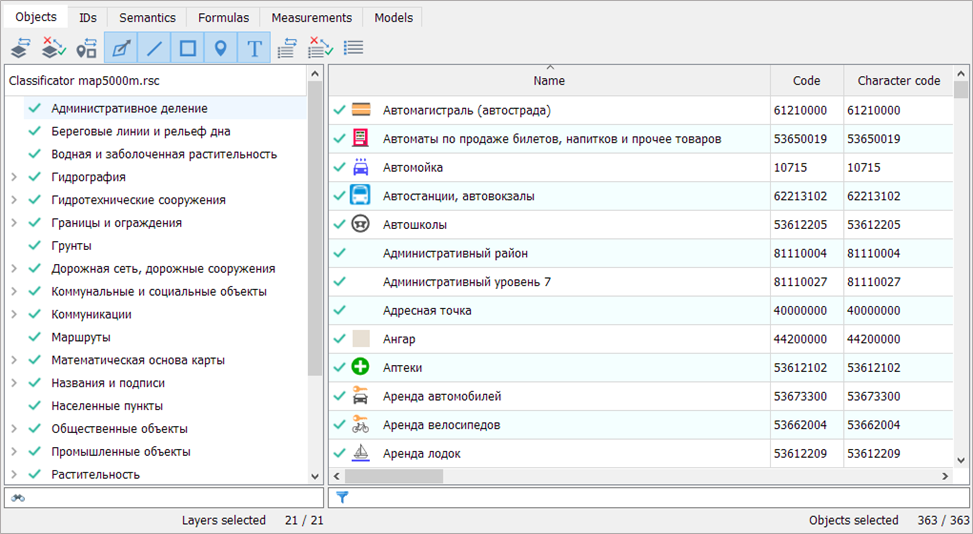
Objects

Criteria for selecting objects by layers, classes, localization, and object types

Sheets

Criteria for selecting objects by nomenclature sheets and unique numbers

Semantics

Criteria for selecting objects based on the values of semantic characteristics

Formulas

Criteria for selecting objects based on a list of mathematical formulas and value ranges

Measurements

Criteria for selecting objects based on their spatial characteristics

Models

Saving all object selection conditions


Additional Settings


clip0139


Show All Classifier Objects

Display the full classifier composition on the "Objects" tab

Apply to All Maps with the Same Classifier

Duplicate the object selection conditions set for the current map to all maps with the same RSC classifier

Select All Objects / Only Graphic Objects / Do Not Select Graphic Objects

Setting Conditions for Selecting Graphic Objects

Disable Objects Invisible in the Base Scale

Disables the display of objects whose visibility range does not include the map's base scale. Used when configuring multi-scale maps that change the set of displayed objects during zooming

Search/Select Across All Maps

Searching for or selecting objects on all maps in the document. Each map has its own selection conditions (available in the "Search and Selection" mode)

Display Clusters

Enables the aggregation of point symbols for which cluster display is configured in the classifier (available in the "Map Composition" mode)

Visible Only

Selection conditions are applied only to displayed objects (available in the "Search and Selection" mode)