Object properties |


|
|
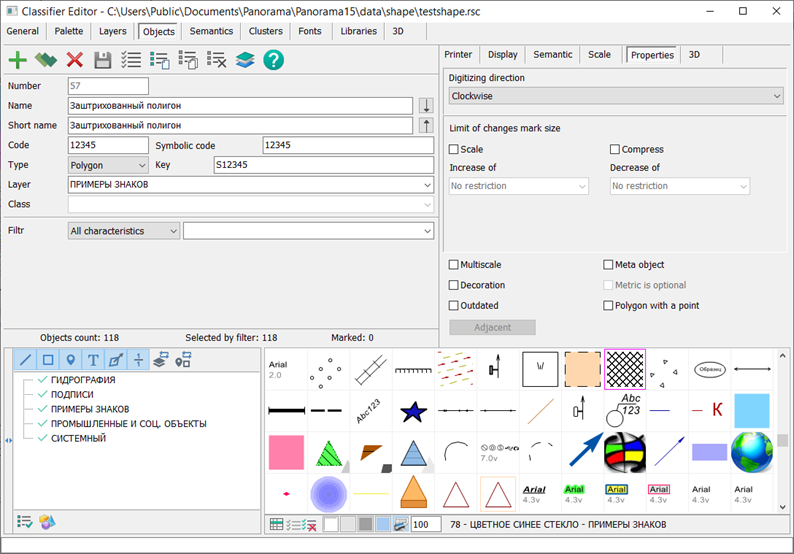
In the Properties tab, auxiliary properties of conventional symbols and digital description rules on the vector map are set. Direction of digitizing can be set for polygon and line objects. For different types of symbols, you can set the Not pressed and Scaled checkboxes. Not pressed flag means that at a display scale smaller than the base one from the map passport, the size of the sign will not decrease. Scaled attribute means that on a display scale larger than the base one from the map passport, the size of the sign will increase with a lag according to the formula: newscale = 1. + (scale - 1)/2. For example, if the image is enlarged by 4 times, the size of the sign will increase by 2.5 times. If necessary, the limits of compression and increase in the size of conventional symbols can be set. To automate the import and export of vector maps in various formats (SHP, GML, JSON, and others), the identification of the view and conventional symbol can be performed by the value of the Symbolic code field, which can contain any characters in UTF16 encoding.
Multiscale objects are used to speed up the display of maps and increase their visibility. Decoration objects are used to improve the appearance of conventional symbols.
The Outdated object property is used to ensure classifier version compatibility. Conventional symbols that may be present on older maps but should not be displayed when selecting symbols for creating new maps must be marked as legacy.
The point polygon is used for automating the placement of a vector sign and/or explanatory label in the center of the polygon. The parameters of the symbolic sign (tabs View and Print) should include the view for the polygon and the view for the sign in the center of the polygon. An example of such an object is contained in the map "shape.sitx", which can be accessed through the main menu: File → Data Examples → in the folder "shape".
The Adjacent button (need to create a link to the Adjacent Objects article) is active for linear objects. When clicked, it opens a dialog for configuring object adjacency rules. These rules provide logical connections between map objects, enabling the execution of logistical tasks. An example of such a map is a road graph. The connectivity of graph objects is ensured by adjacency rules. Linear arcs of the graph network are connected to network nodes through semantics "Start Node Number" and "End Node Number". The rules allow ensuring connections between objects on one or several maps opened in a single window. Adding adjacency rules improves the quality of creating maps containing connected objects of road networks, pipelines, network graphs and others, as well as enhances the quality control of existing maps.
The Single Point metric property is active only for vector objects and is set for objects for which sign direction is not important. The Meta-object property is set for objects that are not displayed on the map (under normal conditions) and which store metadata about terrain areas, a group of map objects, or auxiliary objects used for solving specific tasks. When the Meta-object property is selected, the Metric is optional property of the meta-object becomes available for selection. |