Adjacent objects |


|
|
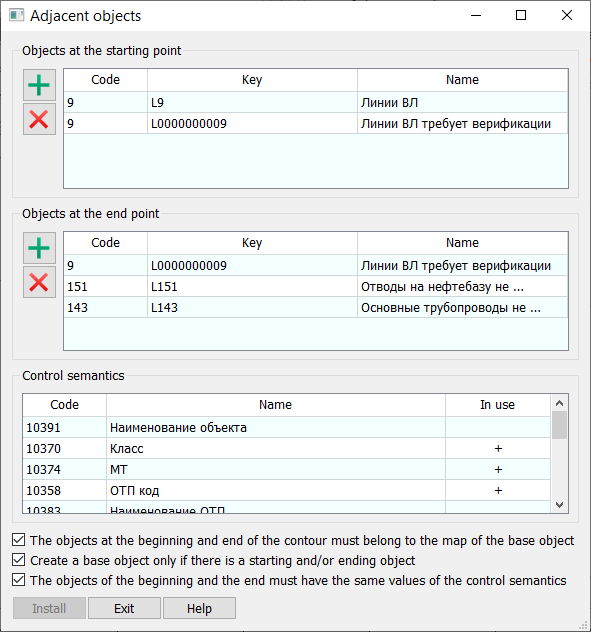
Adjacent objects are those to which the beginning and/or end of a linear object must be connected. Map object adjacency rules ensure logical connections between them, allowing logistical tasks to be performed. On the Objects tab in Properties, the Adjacent button opens the dialog for configuring object adjacency rules.
When configuring rules, object types that are adjacent to the beginning and end of the object's contour are selected. The list of object types that should be adjacent to the beginning of the edited linear object type is displayed in the Objects at starting point table. The list of object types that should be adjacent to the end of the linear object is displayed in the Objects at ending point table respectively. Adding
To check the adjacency compliance of objects, semantics are used, which are selected from the list of mandatory semantics of the object being edited in the Control Semantics table. The possibility and correctness of adjacency are determined based on the presence of the selected semantics in the adjacent objects and the correspondence of their values. A semantics can be selected or deselected by clicking the left mouse button in the Used column of the table. If a semantics is selected, a "+" is displayed in the corresponding row of this column. Additional connectivity conditions are set by selecting the necessary checkboxes in the dialog box. In their description, the object being created (or edited) is referred to as the base object. Checking the respective boxes means that: • The objects at the beginning and end of the contour must belong to the map of the base object — the search for adjacent objects can only be performed on the same map as the object being created. Otherwise, the search is performed on any map with the same classifier. • Create a base object only if there is a starting and/or ending object — if the required objects are absent and their types do not match, the object creation will not be executed, and the reason will be stated in the comment line. Otherwise, a search for suitable objects will be performed, allowing for the object to be created in any case. • The objects of the beginning and the end must have the same values of the control semantics — when searching for the required objects at the start and end of the contour, the specified semantics will be additionally checked for value matching. |