Tree of Layers and Classes |


|
|
The composition of layers and classes is presented as a multi-level tree. The selection status of a layer or class is changed using the left mouse button in the status display area.
Selection states for a layer or class:
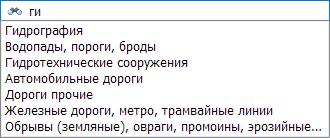
When a layer or class is added to or removed from the selection criteria, the composition in the object table is automatically updated. To quickly find the desired layer or class, enter its name in the search bar.
The search is performed by any substring match and is case-insensitive. When you enter the name of a layer or class, a drop-down list will be automatically generated with names that meet the search criteria. Select the desired item, and the view will navigate to that specific layer or class in the tree.
|

 — included in the selection;
 — not included in the selection.