Export to MIF/MID format |


|
|
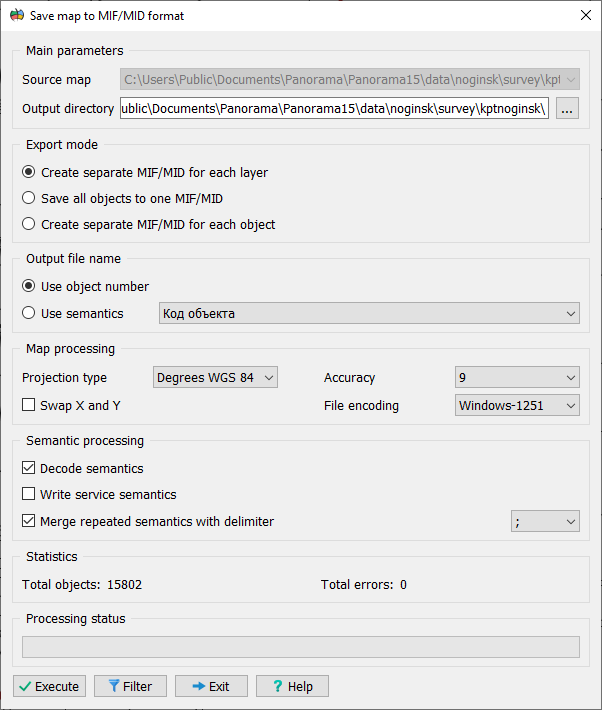
If objects are selected on the map, only those will be processed. If no objects are selected, the objects chosen using the filter via the Object Filter button will be processed.
Main Parameters This section selects the source map and the directory for saving the files. By default, a subdirectory named after the map is created in the current directory to save the files.
Export Mode This section selects the object export mode: • Create a separate MIF/MID for each layer — A separate file will be created for each layer. File names will correspond to the layer keys. • Save all objects in one MIF/MID — All objects will be saved in one common file. The file name will correspond to the name of the processed map. • Create a separate MIF/MID for each object — A separate file will be created for each object. The file naming method is chosen in the Output File Name section.
Output File Name This section allows you to choose the method for generating file names for the "Create a separate MIF/MID for each object" mode: • Use object number — The file name will correspond to the object's number on the map. • Use semantics — The file name will be taken from the value of the specified semantic attribute of the object.
Map Processing In this section, you can select the projection type and the precision of coordinate recording for objects. If necessary, you can swap the X and Y coordinates and select the objects to be processed using the Object Filter button.
Semantics Processing This section is for managing semantics: • Decode semantics — For "List" type semantics, the value description will be saved to the file, not its code/number. • Write service semantics — In addition to regular semantics, the layer name, layer number, object name, object code, object number, object localization, and object key will also be saved. • Merge repeating semantics using a separator — A separator will be added between the values of repeating semantics.
Statistics This section indicates the number of objects that will be processed, as well as the number of errors that occurred during export. |
 This mode is used to export the selected map to MIF/MID (MapInfo) interchange format files.