Automatic placement of specific points

Print Previous page Top page Next page

clip0368 This mode is designed to place characteristic points of cadastral objects and generate labels for both points and objects. To activate the mode, select the cadastral objects to be processed on the map and click the mode button. If no objects are selected, all objects on the specified map will be processed. The program only processes objects of specific types listed in the survey classifier, including the following layers Cadastral Plan of the Territory, Boundary Plan, Correction of Registry Errors.


During cadastral work, it is often necessary to process a large number of cadastral objects to plot their characteristic points on the map according to a predefined algorithm. This mode allows for the automatic creation of Characteristic points, Point labels with sequential numbering, Cadastral object labels with cadastral numbers.


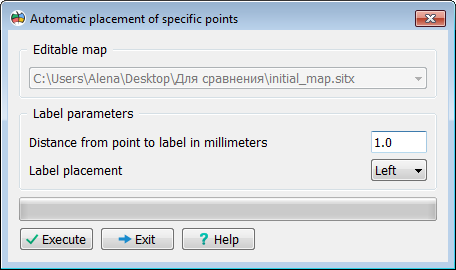
In the mode dialog, you can select:

— The target map for processing

— The distance from the point to the label.


The label position: right or left relative to the object’s contour


Скрин 55672